
Shopify
VeradaをShopifyストアに統合するのは迅速かつ簡単です。提供されたテンプレート(Veradaアカウントキーを追加)をヘッダーまたはフッターに追加し、コンバージョンスクリプトを追加するだけで完了です。
実装の詳細については、カスタム統合ガイドをご覧ください。
ユーザー追跡
注: 普段テンプレートをご自身で更新されない場合は、これらの詳細を開発者にお伝えください。開発者はウェブサイトのソースにバージョン管理を使用している場合があります。その場合、Shopify管理画面を使用してテンプレートを更新すると、開発者によってサイトが更新された際にVeradaのトラッキングが失われる可能性があります。
ユーザー追跡スクリプトは、サイトのヘッダーまたはフッターのいずれかに入力できます。サイトコンテンツが読み込まれ、ページ速度に影響がないように、フッターに配置することをお勧めします。Veradaスクリプトは_非同期_で読み込まれるため、ヘッダーまたはフッターのどちらに実装してもページ速度に大きな影響を与えることはありません。
テーマテンプレートの検索
- Shopifyストアの管理画面にログインします
- オンラインストア / テーマに移動します

- 「...」をクリックし、HTML/CSSを編集するを選択します。
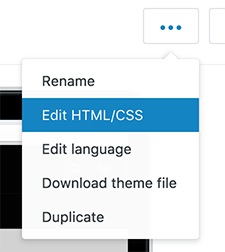
- theme.liquidテンプレートを選択します

トラッキングテンプレートの追加
以下の内容をtheme.liquidに追加し、ファイルを保存します。閉じタグの</body>の直前に追加することをお勧めします。
注: ACCOUNT_KEYとLOADER_URLは、Veradaから提供された情報に置き換える必要があります。
<script>
(function(d, w, s) {
{%- assign pageType = 'page' -%}
{%- case template -%}
{%- when 'index' -%}
{%- assign pageType = 'home' -%}
{%- when 'product' -%}
{%- assign pageType = 'prod' -%}
{%- when 'collection' -%}
{% assign pageType = 'cat' -%}
{%- when 'cart' -%}
{% assign pageType = 'cart' -%}
{%- when 'search' -%}
{% assign pageType = 'srch' -%}
{%- when 'blog' -%}
{%- assign pageType = 'blog' -%}
{%- endcase -%}
{%- assign lineItemCount = 0 -%}
{%- assign numItems = 0 -%}
{% assign subTotal = 0 %}
var items = [];
{%- for item in cart.items -%}
{%- assign lineItemCount = lineItemCount | plus: 1 -%}
{%- assign numItems = numItems | plus: item.quantity -%}
{%- assign lineItemPrice = item.price | times: item.quantity -%}
{%- assign subTotal = subTotal | plus: lineItemPrice -%};
items.push({
id: "{{ item.product_id }}",
sku: "{{ item.sku }}".replace(/"/g, '"').replace(/'/g, "'"),
price: {{ item.price }} / 100 || 0, qty: {{ item.quantity }},
name: "{{ item.title }}".replace(/"/g, '"').replace(/'/g, "'"),
qty: "{{ item.quantity }}",
url: "//" + window.location.hostname + "{{ item.url }}",
image: "{{ item | img_url }}"
});
{%- endfor -%}
var f = w.fanplayr = w.fanplayr || { _i:[] };
f._i.push({
version: 3,
accountKey: 'ACCOUNT_KEY',
allowOfferPrompt: false,
applyToCartUrl: '/discount/%c?redirect=' + window.location.pathname + window.location.search + '#FP_COUPON_APPLIED',
data: {
lineItemCount: {{ lineItemCount }},
numItems: {{ numItems }},
subTotal: parseFloat('{{ subTotal }}') / 100 || 0,
total: parseFloat('{{ subTotal }}') / 100 || 0,
discount: 0,
discountCode: '',
pageType: '{{ pageType }}',
categoryId: '{{ collection.id | replace: "'", "'" }}'.replace(/'/g, "'"),
categoryName: '{{ collection.title | replace: "'", "'" }}'.replace(/'/g, "'"),
productId: '{{ product.id | replace: "'", "'" }}'.replace(/'/g, "'"),
productName: '{{ product.title | replace: "'", "'" }}'.replace(/'/g, "'"),
productSku: '{{ product.sku | replace: "'", "'" }}'.replace(/'/g, "'"),
productPrice: parseFloat('{{ product.price }}') / 100 || 0,
productUrl: '//' + window.location.hostname + '{{ product.url }}',
productImage: '{{ product.featured_image | img_url }}',
currency: '{{ shop.currency }}',
products : items,
cartAction: 'override'
}
});
var js = d.createElement(s);
var fjs = d.getElementsByTagName(s)[0];
js.async = true;
js.src = 'LOADER_URL';
fjs.parentNode.insertBefore(js, fjs);
})(document, window, 'script');
</script>チェックアウト拡張機能トラッキング
チェックアウトと注文のトラッキングはカスタムピクセルとして有効になります。
- 設定に移動します。
- 次に顧客イベントに移動します。
- カスタムピクセルを追加をクリックし、「Verada Checkout Extensibility」という名前を付けます。
- アクセス権を不要に設定します。
- データ販売を収集されたデータはデータ販売に該当しませんに設定します。
- 以下のJavaScriptコードをコードエディタにコピー&ペーストします。コード内の
ACCOUNT_KEY、STORE_DOMAIN、LOADER_URL変数をVeradaから提供された値に更新してください。 - 新しいカスタムピクセルを保存します。
- 接続をクリックしてピクセルを有効にします。
const accountKey = "ACCOUNT_KEY";
const storeDomain = "STORE_DOMAIN";
const loaderUrl = "LOADER_URL";

analytics.subscribe('all_standard_events', (event) => {

    if (!event?.name || !event?.data?.checkout) {
        return;
    }

    if (!document.getElementById("fpShopifyCheckout")) {
        const script = document.createElement("script");
        script.id = "fpShopifyCheckout";
        script.src = "https://cdn.fanplayr.com/customers/shopify/shopify_checkout.js";
        script.async = true;
        script.dataset.accountKey = accountKey;
        script.dataset.storeDomain = storeDomain;
        script.dataset.loaderUrl = loaderUrl;
        document.head.appendChild(script);
    }

    window.fpShopifyCheckoutOnReady = window.fpShopifyCheckoutOnReady || [];

    window.fpShopifyCheckoutOnReady.push(fpShopifyCheckout => {
        fpShopifyCheckout.trackEvent(event);
    });
});
注文追跡 - レガシー
注文スクリプトは、設定の注文完了ページに追加されます。
- 設定 / チェックアウトに移動します
- 注文処理までスクロールし、追加スクリプトボックスを見つけます
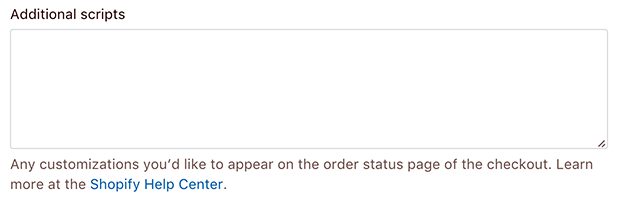
- 以下のスクリプトを追加して保存します。
注: ACCOUNT_KEYとLOADER_URLは、Veradaから提供された情報に置き換える必要があります。また、STORE_DOMAINはストアのドメインに置き換える必要があります。
<script>
{%- assign discount = 0 -%}
{%- assign discountCode = '' -%}
{%- for discount in order.discounts -%}
{%- assign discount = discount | plus: discount.savings -%}
{%- assign discountCode = discountCode | append: discount.code -%}
{%- assign discountCode = discountCode | append: ',' -%}
{%- endfor -%}
(function(d, w, s) {
var items = [];
{%- for item in order.line_items -%}
items.push({
id: "{{ item.product_id }}",
sku: "{{ item.sku }}".replace(/"/g, '"').replace(/'/g, "'"),
price: {{ item.price }} / 100 || 0,
qty: {{ item.quantity }},
name: "{{ item.title}}".replace(/"/g, '"').replace(/'/g, "'"),
url: "//" + window.location.hostname + "{{ item.url }}",
image: "{{ item | img_url }}"
});
{%- endfor -%}
if ( !w.fp_sales_orders ) {
w.fp_sales_orders = {
version: 3,
accountKey: 'ACCOUNT_KEY',
storeDomain: 'STORE_DOMAIN',
data: {
orderId: '{{ order.order_number }}',
orderNumber: '{{ order.order_number }}',
subTotal: (parseFloat('{{ order.total_price }}') / 100 || 0) - (parseFloat('{{ order.tax_price }}') / 100 || 0) - (parseFloat('{{ order.shipping_price }}') / 100 || 0) + (Math.abs(parseFloat('{{ discount }}') / 100 || 0)),
total: parseFloat('{{ order.subtotal_price }}') / 100 || 0,
discount: Math.abs(parseFloat('{{ discount }}') / 100 || 0),
discountCode: '{{ discountCode | replace: "'", "'" }}'.replace(/'/g, "'").substr(0, '{{ discountCode | replace: "'", "'" }}'.replace(/'/g, "'").length - 1),
shipping: parseFloat('{{ order.shipping_price }}') / 100 || 0,
tax: parseFloat('{{ order.tax_price }}') / 100 || 0,
currency: '{{ shop.currency }}',
orderEmail: '{{ order.email | replace: "'", "'" }}'.replace(/"/g, "'").replace(/'/g, "'"),
firstName: '{{ order.customer.first_name | replace: "'", "'" }}'.replace(/"/g, '"').replace(/'/g, "'"),
lastName: '{{ order.customer.last_name | replace: "'", "'" }}'.replace(/"/g, '"').replace(/'/g, "'"),
customerEmail: '{{ order.customer.email| replace: "'", "'" }}'.replace(/"/g, '"').replace(/'/g, "'"),
customerId: '{{ order.customer.id }}',
products: items,
cartAction: 'override'
}
};
var js = d.createElement(s);
var fjs = d.getElementsByTagName(s)[0];
js.async = true;
js.src = 'LOADER_URL';
fjs.parentNode.insertBefore(js, fjs);
}
})(document, window, 'script');
</script>Shopify Plusチェックアウト - レガシー
Shopify Plusアカウントをお持ちの場合、Veradaウィジェットをチェックアウトに追加できます。これにより、ユーザーが訪問中に獲得した割引を思い出させ、その割引を適用するのに役立ちます。
テーマテンプレートの検索
- Shopifyストアの管理画面にログインします
- オンラインストア / テーマに移動します
- 「...」をクリックし、HTML/CSSを編集するを選択します。
- checkout.liquidテンプレートを選択します

トラッキングテンプレートの追加
以下の内容をcheckout.liquidに追加し、ファイルを保存します。閉じタグの</body>の直前に必ず追加してください。
注: ACCOUNT_KEYとLOADER_URLは、Veradaから提供された情報に置き換える必要があります。また、STORE_DOMAINはストアのドメインに置き換える必要があります。
<script>
  (function (d, w, s) {
    var f = (w.fanplayr = w.fanplayr || { _i: [] });

    var noDiscountApplied = true;
    var spans = document.getElementsByTagName('span');
    for (var i in spans) {
      if (!spans[i].getAttribute) {
        continue;
      }
      var attr = spans[i].getAttribute('data-checkout-discount-amount-target');
      if (attr) {
        noDiscountApplied = false;
      }
    }

    var checkForCouponApplication = function () {
      var m = window.location.hash.match(/coupon=([^&]+)/);
      if (m && m.length == 2) {
        window.location.hash = '';
        var el = document.getElementById('checkout_reduction_code');
        if (el) {
          el.value = m[1];
          var btn = el.parentNode.parentNode.getElementsByTagName('button');
          if (btn.length) {
            btn[0].removeAttribute('disabled');
            btn[0].click();
          }
        }
      }
    };
    var couponInterval = setInterval(checkForCouponApplication, 100);

    f._i.push({
      version: 3,
      accountKey: 'ACCOUNT_KEY',
      storeDomain: 'STORE_DOMAIN',
      applyToCartUrl: '#coupon=%c',
      allowOfferPrompt: noDiscountApplied,
      data: {
        pageType: 'checkout',
        currency: '{{ shop.currency }}',
        cartAction: 'repeat'
      }
    });
    var js = d.createElement(s);
    var fjs = d.getElementsByTagName(s)[0];
    js.async = true;
    js.src = 'LOADER_URL';
    fjs.parentNode.insertBefore(js, fjs);
  })(document, window, 'script');
</script>