
Conversion Definitions
Orders are not the only way that your users can be considered converted in Verada. For example, a video streaming platforms may consider users clicking a widget that takes them to a video as converting. To handle situations like this you create conversion definitions to specify what defines a conversion on your site.
By default, there are two implied conversion definitions applied to every account:
- Verada Order: This would be an order on your site that can be directly attributed to Verada's system.
- Non-Verada Order: This would be an order on your site that is not attributed to a Verada service.
You can create as many additional conversion definitions as needed, each with a maximum of three rules that have to be met before triggering a conversion.
Usually, these conversion definitions are defined in Verada's contract and will be managed by your customer success manager. Verada may also attribute a charge to each conversion definition that will be totaled for all conversions of that type at the end of each month to be invoiced. Again, the billing details will be as per the Verada contract. These definitions are marked as being "Verada Attributions".
Charge Calculation Rule
 Figure 1: Charge Calculation Rule
The charge calculation rule at the top of the page indicates how the system will manage invoicing calculations when multiple Verada attribution conversion definitions overlap. There are three options here:
- All: All charges are totaled
- Highest: Only the highest charge will be billed for each conversion
- Lowest: Only the lowest charge will be billed for each conversion
This value is managed by your customer success manager. Please reach out if you have questions.
List
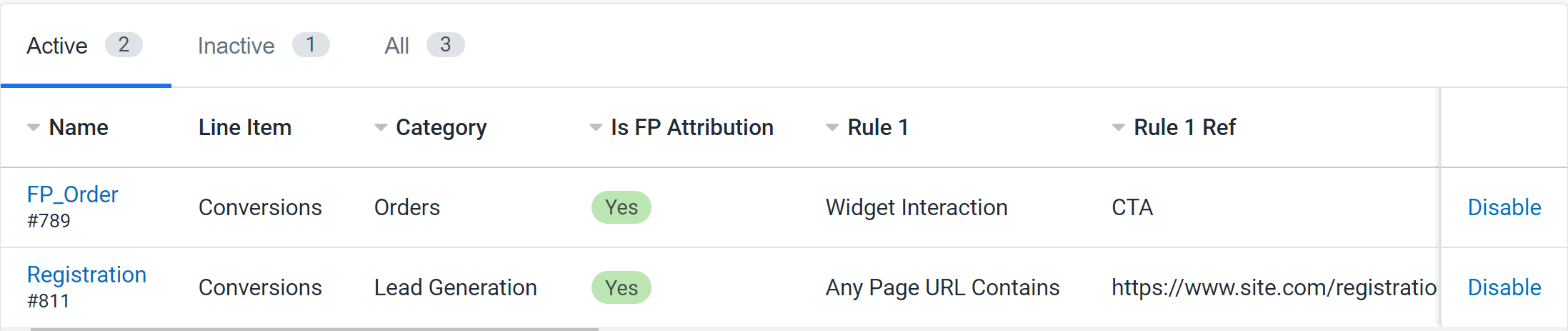 Figure 2: Conversion Definition List
All conversion definitions can be seen in the list. The tabs at the top will filter the definitions by their status. Definitions can be created at any point, and any definitions that are not Verada attributed can be disabled at any point. Please reach out to your customer success manager if one of the Verada attribution definitions is incorrect.
Edit
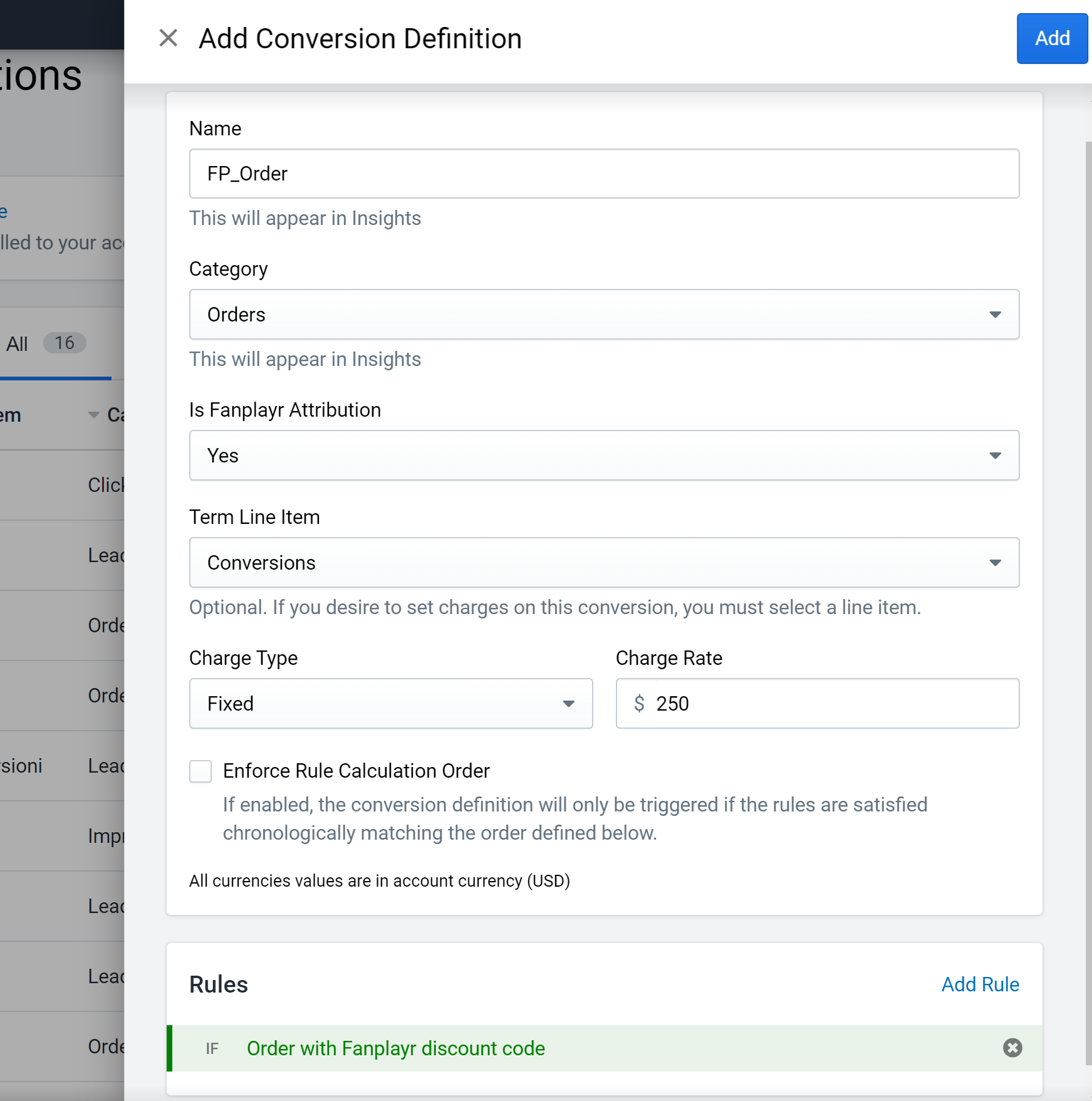 Figure 3: Conversion Definition Edit
Definitions can only be edited by your customer success manager. If you feel there is a problem with one of your conversion definitions, please reach out to your Verada representative. If there is an issue with a non-Verada attribution definition, feel free to disable the definition in the list.
The following is a list of fields on a definition:
- Name: This is how the definition will be referenced throughout the portal.
- Category: This value is used in Insights. It will be one of:
- Orders
- Lead Generation
- Impression
- Click
- Other
- Is Verada Attribution: This value denotes if the definition if it is VR-attributed. This must be "Yes" if the definition is to have charges attached (only for account managers).
- Term Line Item: This value is used to attach the definition to Verada's internal invoicing system (only for account managers).
- Charge Type: The charge type determines whether the definition charge is attributed as a fixed value per conversion or as a percentage of the product sold (only for account managers).
- Charge Rate: The charge rate is what is applied to each chargeable conversion and summed at the end of each month (only for account managers).
- Minimum Charge: If the charge type is "Percent", the amount charge to your account per conversion attributed to this will be at least this value (only for account managers).
- Maximum Charge: If the charge type is "Percent", the amount charge to your account per conversion attributed to this will be at most this value (only for account managers).
- Enforce Rule Calculation Order: If enabled, the conversion definition will only be triggered if the rules defined are met in order as defined in the definition. This means that each rule must be met on or after the same page view as the previous rule.
- Rules: These are the rules that make up the conversion definition. Once all these rules are met, Verada marks that a conversion has occurred and attributes it to this definition. There are a maximum of three rules per definition.